Hi all,
hereby info on the presentation block 1 GID.
As we have said before: when you have worked every week, done the research, experiments etc., chances are big you passed this block (even if the final outcome is not as you hoped for).
WHEN
Monday 16 June – start at 10:00 hrs
Group Lisa: 10:00 – 12:30
Group Michiel: 13:00 – 15:30
Make sure your presentation is ready by 10:00 ! !
LOCATION
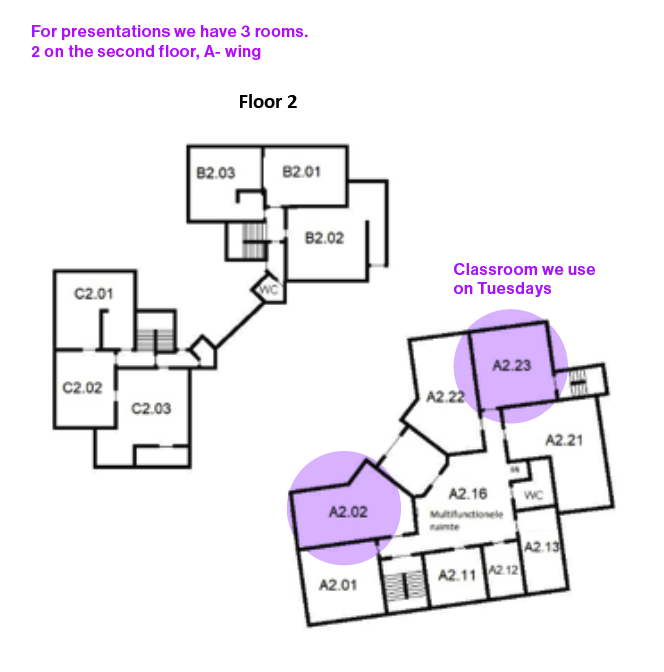
Zuiderdiep: A2.02 and A2.13 (see image attached to this mail)
PRESENTATION
From 10:00 – ±15:00
The workshop specialists will try have a look and talk with you about your work and experiences in the workshops (probably in the afternoon, 13:00hr – …)
We think is enough space for everybody, although these rooms not have many walls. So maybe also use tables.And if there is not that much space, do do not show all your workshop posters, since they take a lot of space). But be sure you can show them if we want to see them.
Don’t forget to bring material as tape to hang your stuff.
We don’t specify the spaces for each of you. When hanging your work please find a balance between taking enough space to present your work in a good way and everybody having enough space.
WHAT TO SHOW
– this presentation is the assessment of this block AND a presentation of your workshop carrousel – so be sure to show a lot of that. (Workshop specialists will probably also look at what you have done).
– Provide the audience with an overview of your block (think: a tutor who is familiar with the assignments, but not with your work)
– We are interested in your process and experiments, so include these in your presentation. If there is not enough space to show everything, make sure you have it by hand to show (stack of prints, on the laptop…)
– Include material from every week
– The A-Z work: You need to print a minimum of 5 spreads and the cover (front and back). You can present them as prints on the wall, or folded as a booklet. Please show and cut them on/to actual size.A complete printed booklet has our preference, but we realise that is not for everybody possible/feasible, or not your ambition.
Of course you have (and can show) a digital version of the complete collection of spreads and cover – Include work from the workshops
– the blog can be a part of your ‘live’ presentation (for instance showing parts of it on your laptop)
– NOTE ! : you also have to make a digital presentation of max. 15 slides. which you have to upload in MS Teams (more info on this presentation at the bottom of this mail).
If you want you can use this digital presentation as a part of your physical presentation.
GENERAL INFO
– Everyone has a timeslot of 15 minutes: you present max.7 minutes, after which we have 8 minutes for questions, discussion, reflection.
– You will present to your Michiel and Hendrik
– Of course you can be (and we like you to be) present at the presentation of classmates (Family, friends etc are not allowed to be present, only students/tutors of Minerva are allowed)
– During a presentation/discussion we know it is hard to remember what is discussed, you can ask somebody else from your group to make notes.
INFO ON ASSESSMENT
When there is no doubt about your presentation/work we will tell you at the end of your presentation you passed.
In case we have doubts: there will always at least two tutor who had a look and we will mail you at the end of the day if you have passed or have to do a ‘repair’.
The assessment-form with written feedback you will receive later, hopefully within two weeks after presentation.
You will receive a pass / no pass, not a grade.
INFO ON DIGITAL PRESENTATION
You have to make a presentation of max. 15 slides which you have to upload in Teams!
Again: Provide the audience (a tutor that is not familiar with your work) with an overview of your block.
– we are interested in your process and experiments, so include these in your presentation.
– Include material from every week
– some short reflection, for instance what you found most interesting/inspiring/boring/difficult/etc, this can be per page, or more general at the end or beginning
Upload your presentation in Microsoft Teams in the folder ‘Digital Presentation’ (Channel ‘General’ > Files > Digital Presentation
– Please upload the document a day in front.
– Name your document “VGVP21GRA1_studentnumber_NameSurname” (for example “VGVP21GRA1_12345_JohnDoe”)
– Note: please save your presentation for screen / in low or medium resolution – and not for ‘Print’ or in ‘High resolution’
We hope to have given you all the info you need.
Good luck with your last works, and enjoy doing it!
Lisa, Hendrik and Michiel
– – – WEEK 5 – – –
5A) STUDIO ARCHIVE | Sticks & Stones
You’ll be working in one of the graphic workshops, document: photograph your results.
Synthesize Workshops:
How now to integrate the results of the workshops in your dictionary and designs?
Upload this in your week-post.
5B) LAB ARCHIVE / | BeREAL/Cherrypicking
Again: 5 images – like previous weeks 1B), 2B), 3B)
Upload this in your week-post
The 3 Hints are
01: Photograph the subject ‘Orange’
02: Make a picture of ‘the life inside’
03: Photograph things that are created by animals
5C) The dictionairy
COVER
Cover, spine and back
Create sketches of different covers… Think of a theme or / and title.
Work analogue digital or mix it up.
What is the story or your cover?
5D) LAB ARCHIVE
PARALLEL prototyping / synthesizing
Cover and back
A dictionary needs a cover and a back…
Last 2 weeks you created 8 spreads based on two scales:
1) on the grid / off the grid and
2) analogue and digital.
Now create more spreads!
Decide in consultation with your tutor what/how you will continue and/or focus on.
Use your archive. How to integrate the results of the workshops in your dictionary? as a chapter? Used in the design of your spreads?
Upload this in your week-post
Note:
Our goal is at the end of the block you have a collection of 26 spreads covering A-Z (and a cover and back)
. if you have made spreads with the same word: these obviously start with the same character, so you can skip other characters
. 26 spreads are not a must… for some designing 26 spreads is do-able, for others it might be more difficult – for instance, because you work very precisely, or make many different versions.
So, chances are your dictionary won’t be complete but make sure to have a ‘blank’ spread for the A and a Z.
Main thing is you push yourself!!
– – – WEEK 4 (May 26 – April 1) – – –
4A) STUDIO ARCHIVE | Sticks & Stones
You’ll be working in one of the graphic workshops.
Document: photograph your results.
Upload this in your week-post.
4B) LAB ARCHIVE / | BeREAL/Cherrypicking
Again: 5 images – like previous weeks 1B), 2B), 3B)
Upload this in your week-post
The 3 Hints are
01: photograph 2 things that are important to you today.
02: arrange to meet a friend today and don’t say where you are, but show it through your photo.
03:take only black and white photo’s today.
4C) LAB ARCHIVE
references
Based on the presentation of Michiel Uilen select five typographic terms (Pages 9-27) and their definition. Add these to your Archive.
4D) LAB archive | A-Z
PARALLEL prototyping – OFF/ON THE GRID ~~~ MAKE THE GRID / BREAK THE GRID
5 DIGITAL spreads
create in Adobe InDesign 5 SPREADS – all of them in a different style / design (on / off the grid)
(a spread is two opposing pages – left and right page. A spread can be a clear left and right page, but also can be a lay-out/image/text which flows over both pages)
Use a different word for each spread (chose words from your archive). Each spread consists of the word, an image (if possible from your archive) and a definition of the word (you can use different kinds of definitions: denotation/connotation, long/short, etc.)
You can use your Archive – for instance (scans of) (parts of) workshop prints
Add this to your Archive / upload in your week post
Upload this in your week-post
Note:
Our goal is at the end of the block you have a collection of 26 spreads covering A-Z (and a cover and back)
. if you have made spreads with the same word: these obviously start with the same character, so you can skip other characters
. 26 spreads are not a must… for some designing 26 spreads is do-able, for others it might be more difficult – for instance, because you work very precisely, or make many different versions.
So, chances are your dictionary won’t be complete but make sure to have a ‘blank’ spread for the A and a Z.
– – – WEEK 3 (May 12 – 18) – – –
3A) STUDIO ARCHIVE | Sticks & Stones
You’ll be working in one of the graphic workshops.
Document: photograph your results.
Upload this in your week-post.
3B) LAB ARCHIVE / | BeREAL/Cherrypicking
Again: 5 images – like previous weeks
Upload this in your week-post
The 3 Hints are
01: take a photo of an animal
02: take a photo of textures
03: take a photo of an item of your favourite colour
3C) LAB archive | You’re not alone / references
You have selected five graphic designers from the 20th century.
Now choose one word from your archive.
Design this word in five different ways based on the style of the five designers. (imitate)
(Photoshop / illustrator / indesign)
You will also work on this in class of Hendrik
Upload this in your week-post.
3D) LAB archive | A-Z
PARALLEL prototyping – OFF/ON THE GRID ~~~ MAKE THE GRID / BREAK THE GRID
3 ANALOGUE SPREADS
create 3 SPREADS in an analogue way – all of them you use a different style style / design (on / off the grid)
(a spread is two opposing pages – left and right page. A spread can be a clear left and right page, but also can be a lay-out/image/text which flows over both pages)
You can choose to use a different word for each spread, or make 3 different spreads using the same word. (choose from your 5 ‘klunen’ words)
Each spread consists of the word, an image (if possible from your archive) and a definition of the word (look at a dictionary to see how it is formulated and designed)
You can use your Archive – for instance (scans of) (parts of) workshop prints
Upload this in your week-post.
– – – WEEK 2 (May 12 – 18) – – –
2A) STUDIO ARCHIVE | Sticks & Stones
You’ll be working in one of the graphic workshops.
Look closely and register five materials and/or tools.
5 Documents: photograph the materials and/or tools.
5 Definitions: what is the name of the material or tool?
For example: you are printing on a sheet of paper.
What’s the name of this paper? Add to this name a short description of the features or use.
Choose between two kind of descriptions.
1 – A description as in a dictionary (denotation)
2 – A description your personal meaning. (connotation)
Upload this in your week-post.
2B) LAB ARCHIVE / | BeREAL/Cherrypicking
(same as week 1, different hints)
Go ‘cherry picking’ meaning take pictures of everything that draws your attention. You don’t need to be a great photographer for this.
. Go out for a walk and take pictures of the things that stand out for you.
. Every day five days in a row. Take your time, around 50-60 minutes and be offline, to observe.
Use the three hints to create your pictures and create the rest yourself.
. Create your photo archive and make a selection of 5 photos.
. Add a keyword or a title. Describe briefly why you took it.
Upload this in your week-post
The 3 Hints are
01: Photograph a stranger.
02: take a photo of your outfit today
03: take a photo of garbage outside or garbage laying in an unsual place
2C) LAB ARCHIVE | Treasurebox
In the class of Lisa you can or document the artefacts in a way you think is appropriate.
Upload your items on the blog
A definition a day;
What is it you collected?
Come up with two kind of descriptions.
1 – A description as in a dictionary (denotation)
2 – A description about what made you put in it your treasure box. (connotation)
so… 5 objects with 10 descriptions in total
2D) LAB archive | A-Z
DIGITAL: Create an alphabet of found characters (each of a different font)
Bring your alphabet with you in class Hendrik on Wednesday
Upload this in your week-post.
ANALOGUE Create an alphabet of found characters (each of a different font) (rubbing, cut & paste)
You can collect existing characters/fonts, and maybe create some yourself
Bring your alphabet with you in class Lisa on Monday
Upload this in your week-post.
2E) LAB archive | You’re not alone / references
Based on the presentation of Michiel Uilen select five graphic designers from the 20th century – you can choose designers not mentioned in the presentation
Document: collect an example of a design
Definition: create a short Wiki. Name, etc.
Upload this in your week-post the blog.
2F) DICTIONAIRY | 5 remarkable words | klunen
Wednesday:
In the class of Hendrik you will work with the found digital characters.
Result: 3 words
Upload this in your week-post.
– – – WEEK 1 (6 – 12 may) – – –
Per week you make 1 post which contains all your work from that week
note: task 1C) – don’t upload, take with you to next weeks class of Lisa
Laboratory stands for Research and Design
Studio stands for Technology and skills
1A) STUDIO ARCHIVE / Sticks and stones
Collect before Wednesday 5 examples of ordinary analogue graphic design.
For example, a leaflet, a manual, packaging design.
Make a (dictionary) discription of the graphic designs.
Upload what you collected in the week-post
1B) LAB ARCHIVE / | BeREAL/Cherrypicking
Go ‘cherry picking’ meaning take pictures of everything that draws your attention. You don’t need to be a great photographer for this.
. Go out for a walk and take pictures of the things that stand out for you.
. Every day five days in a row. Take your time, around 50-60 minutes and be offline, to observe.
Use the three hints to create your pictures and create the rest yourself.
. Create your photo archive and make a selection of 5 photos.
. Add a keyword or a title. Describe briefly why you took it.
Upload this in your week-post
NOTE: on Wednesday in the class of Hendrik Häntschel you will work with your first images.
The 3 Hints are
01: Photograph 2 things NOW.
02: Take a few pictures today to describe how you are experiencing the weather
03: pick a day and take a photo of everything you eat today before you eat it
1C) LAB ARCHIVE / Treasurebox
Find a box or suitcase. At the end of each day, you will put one item (artefact) in the box that for some reason stands out for you that day.
(5 objects in total)
Bring these items with you to next week’s class of Lisa
1D) DICTIONARY / Five remarkable words >KLUNEN
Today in Lisa’s class
. Choose a word from your native language.
. One that is remarkable, beautiful, funny, poetic, or typical.
. Write it down in your native language.
. Provide the reader with a translation of the word and the definition. Describe what it means.
Homework
Collect four words of other students.
Document the five results. (save them on your laptop)
Upload this in your week-post.
For pdf’s and more info go to
Microsoft Teams > Team GID 1H block 5 23-24 > Files